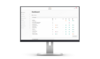

Website monitoring made easy

SYSSY is your tool for managing and monitoring your websites.
Be alerted to problems quickly and take immediate action.
Simple. Efficient. Always up to date.

Try it now for free

The smart website organization tool.

SYSSY supports you in everyday website management and monitoring.

Whether you want to identify security vulnerabilities, need quick information about individual websites, want to check the status of a website, or your customers want to know organisational details about their websites.

With SYSSY, you have all the information you need at your fingertips.

How monitoring works with SYSSY

Start quickly & easily

1. Create a project

Create a project in SYSSY and enter the correct domain for your website.

Activate the API connection and CMS monitoring.

2. Plugin/Extension Download

Download the TYPO3 extension or WordPress plugin and install it on your website.

Then enter the SYSSY API key to connect your website.

3. Identify security gaps

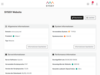
Once a connection is established, you will see current data from your TYPO3 or WordPress.

Identify security vulnerabilities in the core or plugins/extensions immediately.

Comprehensive website monitoring

Features for website monitoring

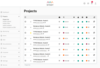
Website and Project Management

Find all your websites with the most important information at a glance in a clearly arranged table.

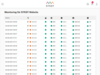
Website Monitoring

Your websites are automatically monitored several times a day, making it easier to detect failures or recurring errors.

Direct connection to CMS

Using a TYPO3 extension or a WordPress plugin, SYSSY retrieves the most important information directly from your website via an interface.

Performance Check

A regular performance check is carried out with Google Lighthouse so that performance is always in view.

Extension & Plugin Monitoring

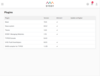
The installed extensions and plugins are regularly checked for security vulnerabilities so that necessary updates can be installed promptly.

Notifications

In the event of website outages or security breaches, you will be notified by email and app notification.

Documentation

Automatic and manual documentation provides an overview of a project's past.

Reports

PDF reports allow you to permanently record the current status and make it available to your customers.

SSL Reminder

Notifications before an SSL certificate expires enable timely action.

SEE SYSSY IN ACTION

Easy going.

ENJOY THE REST. YOU DESERVE IT!

  • Keep track of your websites
  • Monitor CMS used, including version
  • Get an overview of plugins used
  • Use extensive filter functions for evaluations
  • Use the project overview with live analysis
  • Check your GDPR compliance
  • Identify problems quickly thanks to traffic light display

No more ...

THANKS TO SYSSY ALL OF THESE PROBLEMS ARE WATER UNDER THE BRIDGE

  • Manual website monitoring:
    SYSSY automates website monitoring and notifies you in the event of outages or problems.
  • Disorganised documentation:
    SYSSY allows you to document important events, adjustments and changes. This gives you centralised documentation that helps you keep track of your websites and projects.
  • Missed updates:
    SYSSY supports website update management. You are notified when updates are available so that you don't miss any important updates and the security and performance of your websites can be guaranteed. Updates for CMS, plugins, PHP and MySQL are always displayed.
  • Ineffective performance optimisation:
    SYSSY offers a performance check that analyses loading times, server response times and other performance metrics. This information allows bottlenecks to be identified and targeted optimisation measures to be taken to improve website performance.
  • Forgetting to allow search engine indexing after going live

SYSSY currently offers a WordPress plugin and a TYPO3 extension, 
with which you can connect your CMS to SYSSY and have it monitored.

Read moreTest now for free

Start using with full functionality right away. No credit card or payment required.


From our blog

Setting certain HTTP security headers can significantly improve the security of websites or web applications. This article explains which headers to…

Read more
Beware of automatic redirects in TYPO3

TYPO3 automatically creates redirects when the URL of a page changes. A practical feature - but only if it is configured correctly. Otherwise, it can…

Read more
WordPress maintenance done right

WordPress is a powerful, but also vulnerable system - especially if it is not regularly maintained. Without updates, backups and monitoring, a modern…

Read more