Well documented history.
Automatic documentation
SYSSY analyzes the technical data of your websites at least once a day and recognizes when problems arise, but also when there are changes. If, for example, the PHP version on the server or the CMS version changes because of security updates, this is recognized by SYSSY and an automatic entry is made in the documentation.
So you can always see when changes were made. This is especially interesting when problems arise.
For example, an update may affect the visibility of your website in search engines because your site is faster or slower, or certain parts aren't working. If you can find everything in your documentation, this helps when communicating with the customer, because with just a few clicks you can find out when exactly what happened.
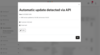
Documentation creates an overview.
Manual documentation
You can also store manual documentation entries in SYSSY. It can be recorded if, for example, search engine optimization or adjustments to CSS are made. This not only has advantages for you, but also for your colleagues. Everyone can understand what happened on the project at any time.
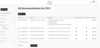
Send update information via email.
Inform customers
There is another benefit of documentation. For example, if you are doing maintenance work on the website, you can record this using a documentation entry and have it automatically sent to your customers by checking a checkbox. A small mouse click ensures great customer happiness, as customers feel well looked after and see that something is happening for their money.
You can create your own email templates for each customer or project, which are automatically used when the documentation is sent. This makes it possible to address customers directly and personally in the automated email.
Keep track
Document the important things
- Never again a "Hm, I have no idea when that was done"
- The history of every project at a glance
- Keep track of all your updates
- Make customers happy by automatically sending out update information